Overview
MioSalon allows you to enable double booking for staff, which means a staff member can handle more than one appointment at the same time. This setting is useful for businesses where overlapping services are operationally possible (for example, color processing + consultation).
This option can be enabled from the Appointment Module Settings.
Purpose
Enabling double booking helps you:
Maximize staff productivity
Avoid blocking the calendar unnecessarily
Handle overlapping services efficiently
Increase revenue during peak hours
Guided Steps to Allow Double Booking for Staff
Follow the steps below:
Go to Settings from the left-side navigation.
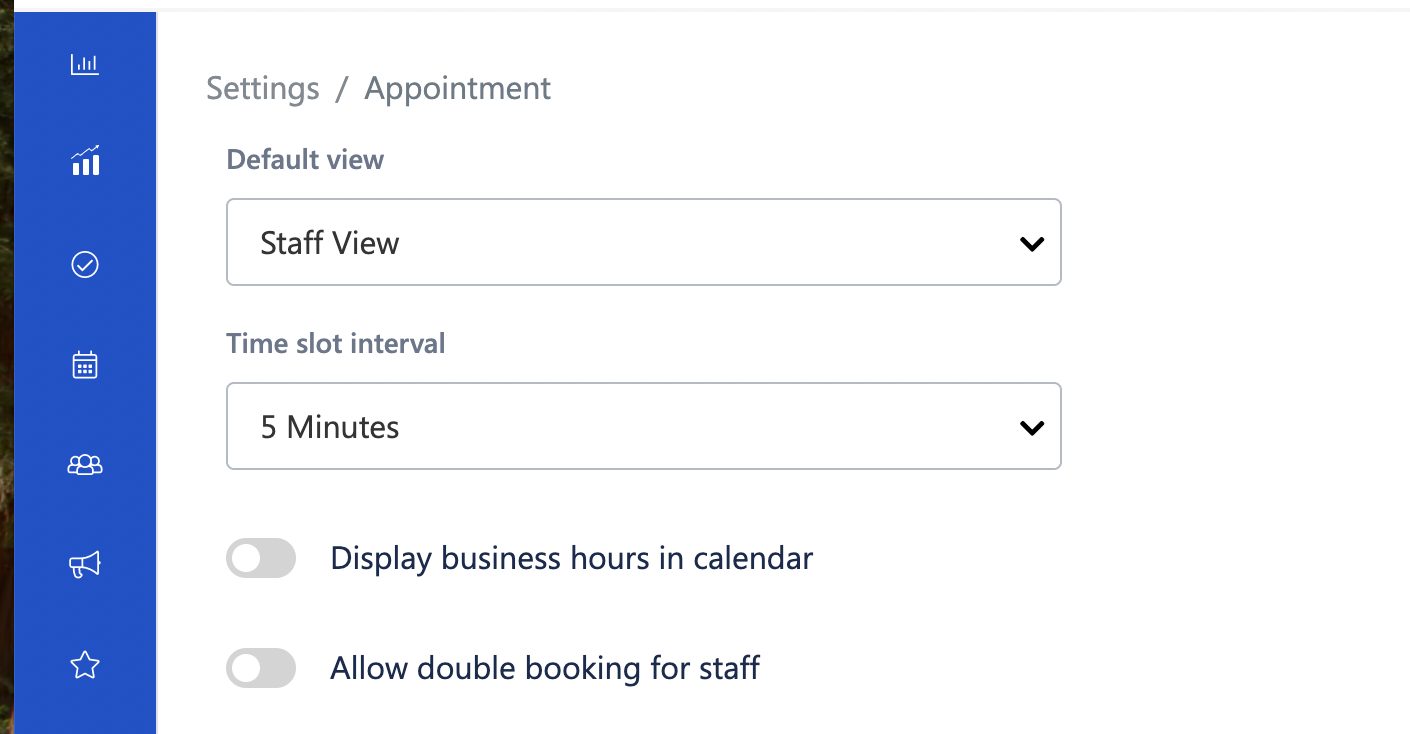
Under Module Settings, click on Appointment.
Scroll down to locate the option:
“Allow double booking for staff.”Toggle the switch ON.
Save the settings (if applicable).
✅ Double booking for staff is now enabled.
What Happens After Enabling This?
The system allows you to create overlapping appointments for the same staff.
The calendar will not block the time slot even if the staff already has an appointment.
Staff can be assigned to multiple services at the same time.
Use Case Scenarios
1. Color Processing Services
A client’s hair color is processing (30–40 mins idle time).
The stylist can start another quick service like a haircut.
2. Senior Stylist Supervision
A senior stylist may consult two clients during overlapping time slots.
3. Partial-Service Overlaps
Certain services do not require full-time attention. Double booking helps optimize these gaps.
Benefits
Improves appointment capacity
Reduces idle time
Increases revenue potential
Offers flexible scheduling during peak hours
Important Considerations
Ensure staff is operationally capable of handling overlapping services.
Avoid enabling double booking if your service model requires full staff attention.
Combine with Resource double booking settings carefully if rooms/equipment are limited.
FAQ
Q1: Will customers see overlapping bookings?
No. Customers only see their own confirmed appointment.
Q2: Can I enable double booking for resources separately?
Yes. There is a separate toggle for “Allow double booking for resource.”
Q3: Can this be turned off later?
Yes. You can disable the toggle anytime from Appointment Settings.
Was this article helpful?
That’s Great!
Thank you for your feedback
Sorry! We couldn't be helpful
Thank you for your feedback
Feedback sent
We appreciate your effort and will try to fix the article