Overview
MioSalon automatically checks service times during hourly package redemption at Quick Sale to protect salon business rules and customer prepaid hours.
When front-desk staff or spa coordinators redeem services from an active hourly package, the system automatically verifies service durations against the package round-off rules, minimum redemption limits, and session caps.
If a selected haircut, massage, or facial treatment conflicts with package rules, leaves an unusable leftover balance, or falls on the customer final visit, interactive popups appear to guide staff to the right resolution.
Handling these rule violation popups smoothly prevents checkout delays, ensures accurate therapist time deductions, and delivers a transparent experience for your salon and spa clients.
Follow the guided step-by-step instructions below to identify, handle, and resolve hourly package redemption rule violation popups in MioSalon.
Hourly Package Rule Violations Summary
Navigation Path
Main Menu → Quick Sale
Service Duration and Package Rule Mismatch Popup
1. In Quick Sale, enter the customer name or phone number in the Customer field (E.g., Vinoth S, +91 7776544578).
2. Click on the Packages button to view the client active hourly packages.
3. In the package service list, locate the service the guest is receiving (E.g., Pre-Treatment Wash 15 mins) and click on Add.
4. If the service standard duration does not align with the package round-off setting (E.g., 15 mins standard treatment duration vs 30 mins package round-off interval), the Select Redemption Duration popup opens with an alert: Service duration does not match package rules. Standard service duration (15 mins) does not align with the package round-off interval (30 mins)
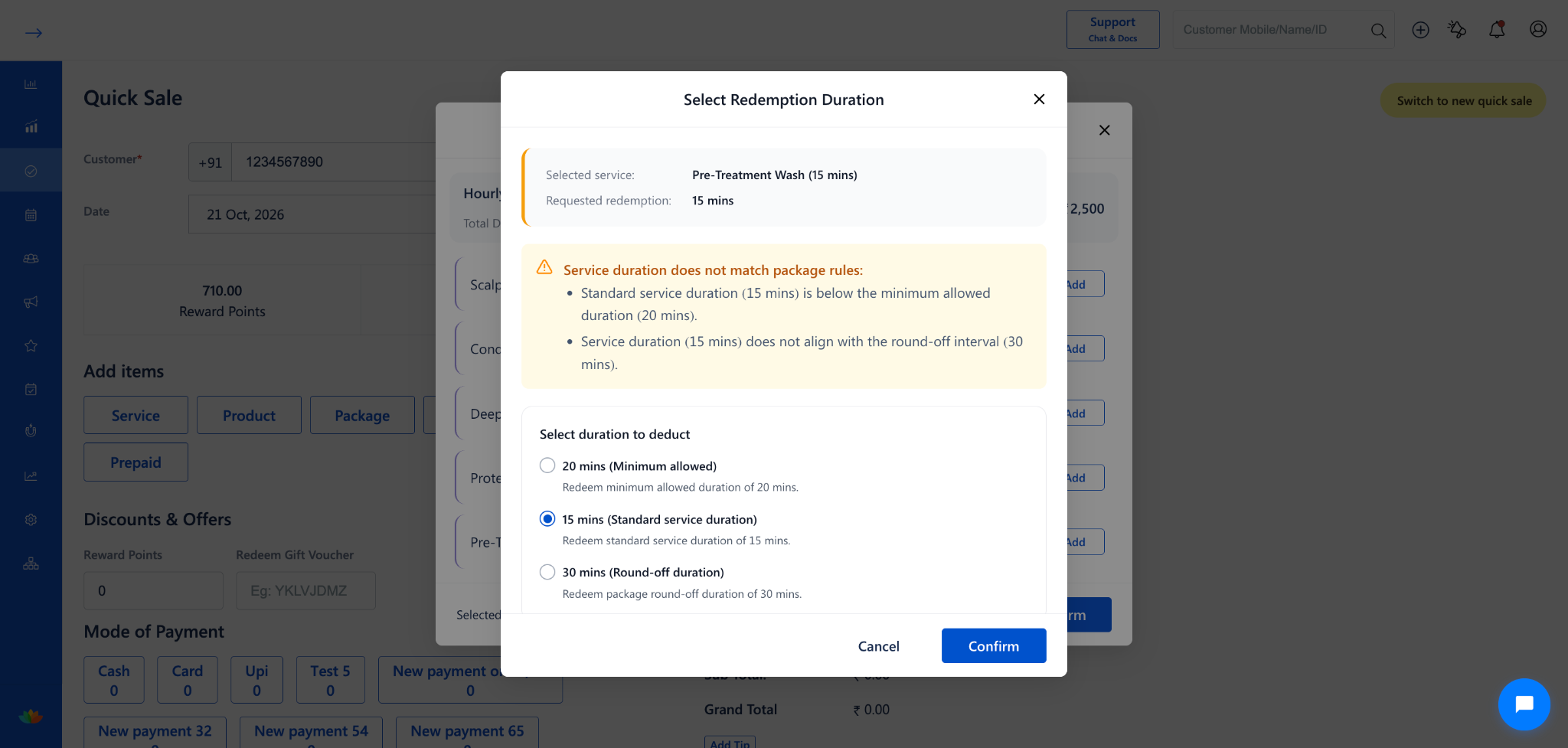
5. Under the Select duration to deduct section, review the 3 duration options:
• 20 mins (Minimum allowed): Deduct only the minimum duration allowed by the package rule, saving the remaining minutes for the guest.
• 15 mins (Standard service duration): Deduct the exact catalog duration of the service without rounding off.
• 30 mins (Round-off duration): Round up deduction to the next full interval according to your salon package policy.
6. Select the radio button corresponding to the duration you wish to deduct from the client package balance.
7. Click on Confirm to add the service with the chosen deduction to the Quick Sale checkout cart, or click Cancel to choose another service.
Leftover Balance Warning and Next Visit Alert Popup
1. In Quick Sale, select a customer holding an hourly wellness package with an active hour balance (E.g., 30 mins remaining balance).
2. Click on Packages, select an extended spa or salon therapy, and enter a custom requested duration (E.g., Pre-Treatment Wash with requested redemption of 15 mins).
3. The system detects that deducting 15 mins leaves an unusable leftover balance of 15 mins, which is less than the package minimum redemption limit (20 mins) and cannot be redeemed for any future salon visit.
4. The Select Redemption Duration popup opens showing a cautionary notice under the selected time
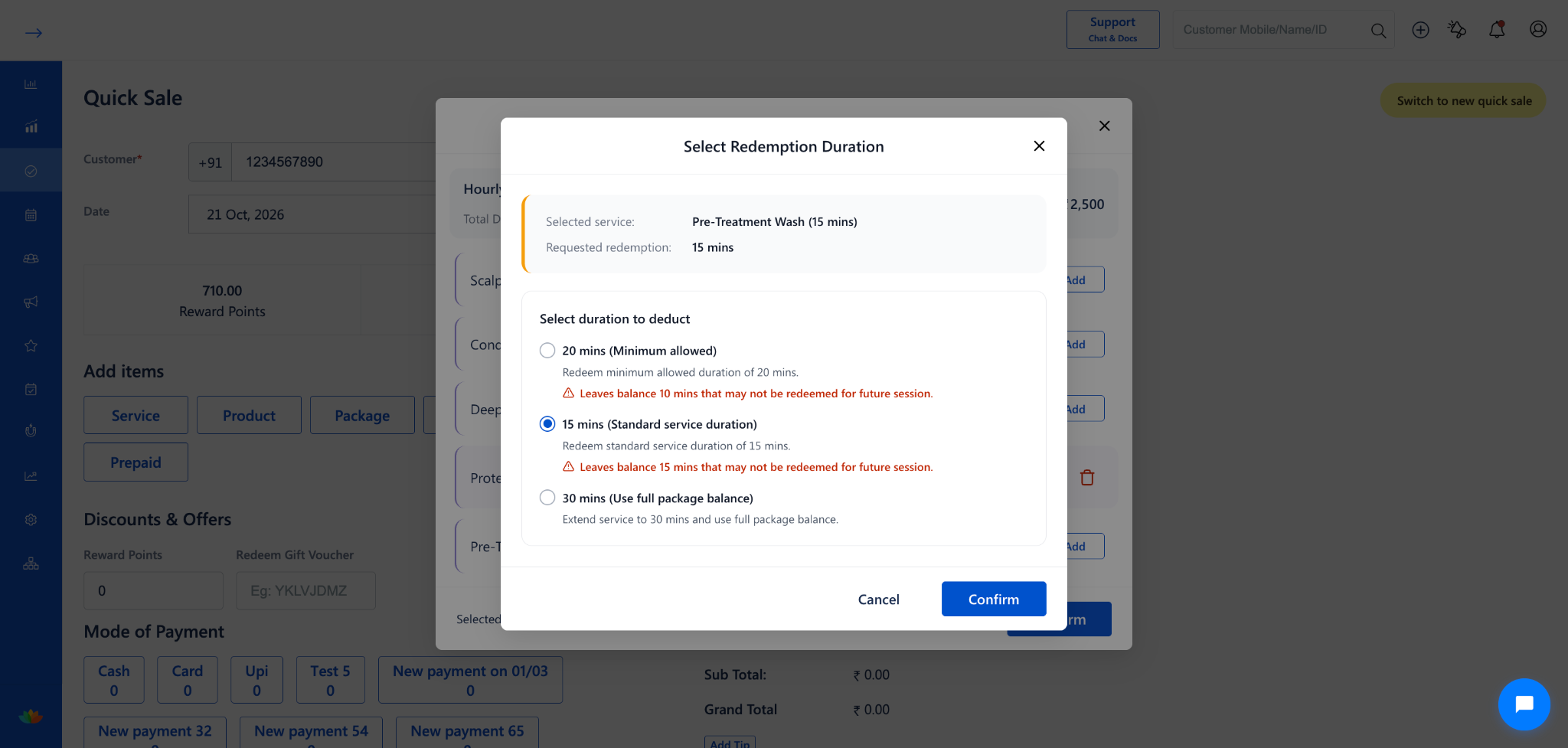
5. Under the Select duration to deduct section, review the recommended solutions:
• 20 mins (Minimum allowed): Deduct 20 mins immediately. Note the warning indicating Leaves balance 10 mins that may not be redeemed for future session.
• 15 mins (Standard service duration): Deduct 15 mins immediately. Note the warning indicating Leaves balance 15 mins that may not be redeemed for future session.
• 30 mins (Use full package balance): Extend the guest session to 5 full hours to cleanly exhaust the entire package balance with zero wasted minutes.
6. Choose the preferred option based on your salon discussion with the guest and click on Confirm.
Use Cases
1. Preventing Orphaned Balances: Alerting cashiers before they deduct 15 mins from a 30 mins pass, helping them extend the treatment to 30 mins full duration and preventing client disappointment later.
2. Transparent Service Time Accounting: Providing clear options when a standard haircut duration of 20 minutes does not align with a 15-minute package round-off policy.
Benefits
1. Enhances Client Trust: Prevents billing confusion by ensuring prepaid hours are fully used or clearly confirmed with the client before checkout.
2. Automates Salon Business Rules: Applies round-off steps and booking limits automatically without expecting cashiers to do manual time calculations.
3. Boosts Front-Desk Productivity: Clear radio options and guided alert messages enable quick decision-making during peak salon checkout hours.
4. Protects Salon Revenue: Ensures service times and therapist commissions match salon package rules without billing mistakes.
Was this article helpful?
That’s Great!
Thank you for your feedback
Sorry! We couldn't be helpful
Thank you for your feedback
Feedback sent
We appreciate your effort and will try to fix the article